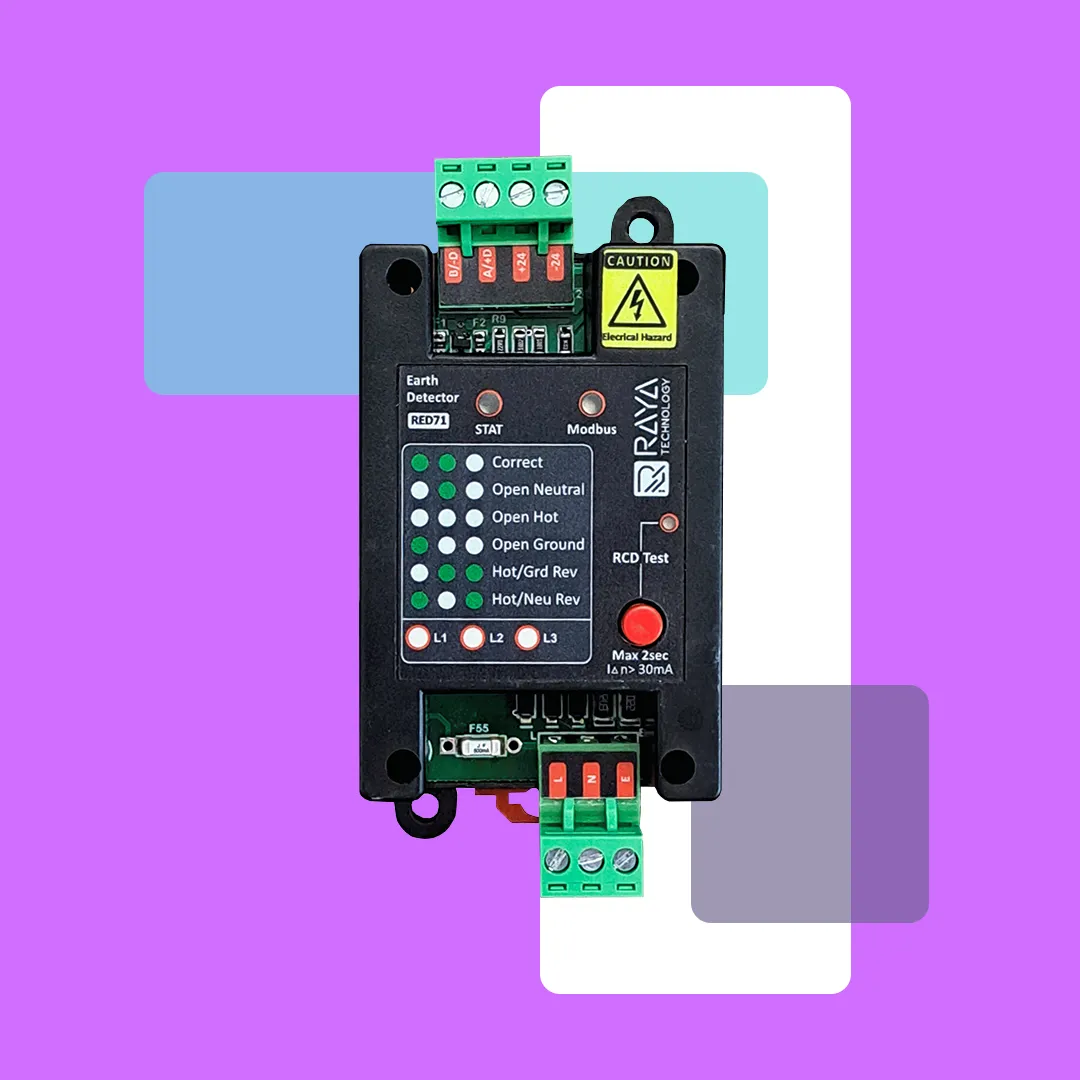
The RED71 Earth Detector from Raya Technology is a ground fault and wiring error detection module designed to monitor the integrity of neutral, phase, and earth connections in both single-phase and three-phase electrical systems. Utilizing the Modbus protocol, it can be integrated into industrial monitoring and automation systems. The device includes an RCD (Residual Current Device) test button with a test current of 30 mA for up to 2 seconds. It is recommended for use in industrial electrical panels, data centers, and sensitive equipment to enhance safety and prevent hazards caused by earth faults.
* In addition to integration with Modbus-based industrial automation systems, this device can also be installed independently in an electrical panel. With its built-in LED indicators, the earth status can be accurately identified and monitored without the need for additional systems.

Modbus RTU protocol network communication

Standard 6-state earth tester output

Ability to install DIN rail and wall simultaneously

Has a life protection system test key
Modbus RTU Protocol over RS-485 Network
The communication protocols embedded in this device enable seamless integration with various PLCs, DCSs, and RTUs.
✅ Industrial and building electrical panels: Ensures proper wiring and prevents risks caused by backflow currents or faulty earth connections.
✅ Electrical monitoring systems: Instantly detects earth leakage faults and allows for transmission to a central monitoring system.
✅ Data centers and sensitive equipment: Prevents equipment damage caused by grounding issues.
✅ Commissioning phase of building or industrial projects: Enables initial verification of wiring integrity.
✅ UPS and generator systems: Monitors the health of neutral and earth paths to prevent unintended current backflow.
The indicators are divided into three main categories:
A) Fault or connection status indicators (left side)
B) System status indicators (top side)
C) RCD Test button
C) RCD Test Button:
🔴 A push-button used to test residual current leakage. When pressed, it injects approximately 30 mA of current to the ground in order to verify the operation of the Residual Current Device (RCD).
The button should not be pressed for more than 2 seconds at a time.
B) System Status Indicators (Top Side):
🔴 STAT (Status LED): This LED has two blinking modes:
Fast blinking (approximately 3 times per second): Indicates one of the following conditions:
1) Attempting to establish communication
2) Communication is lost
3) A system error has occurred
Slow blinking (once every 3 seconds): Indicates that the sensor is in standby mode and operating normally without any detected faults.
🔵 Modbus (Network LED):
The Modbus LED is off by default and briefly blinks only when a request is received from the Modbus Master device.
A) Fault or Connection Status Indicators (Left Side):
⚪️🟢🟢 Correct: No fault detected; proper earth connection.
⚪️🟢⚪️ Open Neutral: Neutral line is disconnected.
⚪️⚪️⚪️ Open Hot: Phase (hot) line is disconnected.
⚪️⚪️🟢 Open Ground: Ground (earth) connection is missing or incomplete.
🟢🟢⚪️ Hot/Ground Reversed: Phase and ground wires are swapped.
🟢⚪️🟢 Hot/Neutral Reversed: Phase and neutral wires are swapped.
✅ Only one of these indicator states will be active at a time to clearly identify the specific fault.
جهت دریافت تمامی ویدئوهای فعلی و جدیدترین ویدئوهای ضبط شده با موضوعات اتصال و راه اندازی محصول و ارتباط با انواع PLC و HMI کلیک کنید.
Yes. These sensors can be connected to various computers (regardless of the operating system) using RS-485 to USB converters.
Your technical questions about the product can be sent as text messages (SMS or social media) to the support team, and the technical experts will respond through the same channels. If needed, they will contact you directly.
Sales and Support Team Number:
+989177391091
Yes. Since the device enclosure has an IP66 protection rating against water and dust ingress, this product can be used in outdoor environments. However, it is not recommended to expose it continuously to rain or direct water spray.
Due to the protective cover on the sensor, sudden sprays of non-acidic liquids are repelled and do not cause any damage to the sensor.
Since this sensor communicates via the Modbus protocol with devices such as PLCs, RTUs, and HMIs, you can view the measurements on industrial HMI displays and your personal computer monitor.
Yes. One meter of flexible four-core cable (power + RS-485) with a thickness of 0.25 mm² is included with the product.
Via the Modbus-RTU network
Yes, the sensor’s slave address can be changed via software using Modbus commands.
The components used in this sensor are manufactured in the USA and Switzerland.
Yes, according to Modbus protocol standards, this is possible. For more information and details on how to differentiate sensor data, you can refer to the sensor setup tutorial file.
You can find all tutorials and necessary files on the product page under the “Product Videos” and “Downloadable Files” tabs. Click here.
Some PLCs have an RS-485 port, allowing the sensor to connect directly. However, for PLCs without an RS-485 port, the sensors must be connected via RS-485 expansion cards.
Due to the sensor’s casing material, it cannot be installed directly inside a furnace. However, the company can provide the sensor with a half-meter cable, allowing customers to place the sensor circuitry outside while installing the sensor itself inside the furnace.